
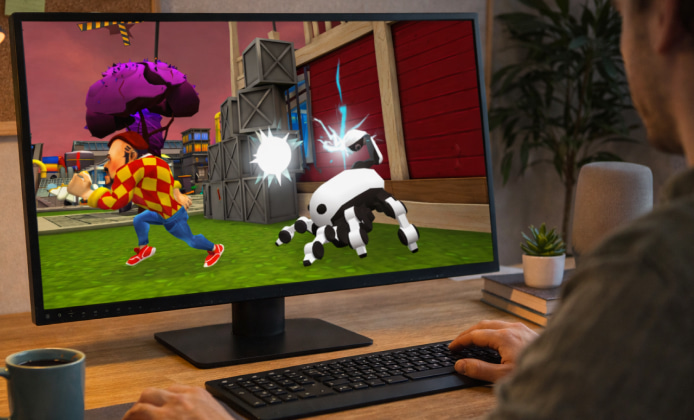
If you enjoy quirky mysteries, sneaky exploration, and puzzle-solving with a dash of humor, Dark Riddle can feel even better on a computer thanks to a larger screen and more precise controls. This guide walks through practical ways to play on Windows, what to check before installing anything, and how to tune performance so the experience stays stable.
Why Play Dark Riddle on Computer?
- Bigger view: spotting clues, pathways, and interactable objects is easier.
- More control options: keyboard and mouse can feel faster for timing-based actions.
- Comfort: longer sessions can be easier at a desk setup than on a phone.
- Streaming/recording: capturing gameplay is usually simpler on PC.
Common Ways to Run Dark Riddle Game on PC
Dark Riddle is widely known as a mobile title, so playing it on a PC often involves running the Android version through an emulator. Some players also use official platform options when available in their region, but the most typical route remains an Android environment on Windows.
- Android emulator: installs an Android-like system on your PC so you can use apps and games.
- Official store route (when available): sometimes a game appears in a PC-friendly catalog.
- Cloud/remote play setup: less common for this genre, but occasionally used for mobile mirroring.
For many players, Dark Riddle download for PC can be the easiest way to enjoy bigger controls at home.
Safety Checklist Before You Install Dark Riddle
Because third-party websites can bundle unwanted software, it’s worth taking a minute to verify what you’re installing. This is especially important when you see claims about “special editions,” “unlimited resources,” or installers that don’t clearly explain what they contain.
- Use well-known app sources and reputable emulator vendors.
- Read the installer steps carefully and decline optional offers you don’t recognize.
- Scan downloads with your security tools, and keep Windows updated.
- Prefer legitimate versions that respect the developer’s distribution model.
A good rule: if an installer feels pushy, hides details, or demands strange permissions, walk away and choose a safer path.
When you decide to download Dark Riddle for PC, it helps to stick to a trusted emulator and an official app source.
Recommended Control Setup (Keyboard & Mouse)
Most emulators let you map touch controls to keys. A simple layout is often enough for comfortable movement and interactions:
- WASD for movement
- Mouse for camera/looking around (if supported)
- E / F for interact
- Space for jump or quick action (depending on the on-screen button)
- Shift for sprint (if available)
Before committing to long sessions, test controls in a calm area of the game and adjust sensitivity so the camera doesn’t feel “floaty.” If you’re searching around, Dark Riddle for PC download is usually easiest to set up by installing an emulator first and then adding the game inside it.
Performance Tips for Smoother Gameplay
Emulator settings can make or break the experience. If the game stutters, loads slowly, or feels laggy, try these adjustments:
- Allocate more CPU cores/RAM: increase gradually rather than maxing out immediately.
- Switch rendering mode: try DirectX or OpenGL and keep the one that’s more stable.
- Enable virtualization: turn on VT-x/AMD-V in BIOS/UEFI for better performance (if supported).
- Lower in-game graphics: reduce shadows or effects if there’s a settings menu.
- Close background apps: browsers and launchers can eat memory.
It’s also smart to run the game in a window first, confirm it’s stable, and then move to fullscreen after everything feels smooth. Some players look for Dark Riddle for PC download for free, but it’s best to avoid shady bundles and stick to legitimate install routes that don’t add surprises.
Quick Troubleshooting
| Issue | What to try | Why it helps |
|---|---|---|
| Lag or stutter | Change renderer, add RAM/cores, enable virtualization | Improves graphics pipeline and resource availability |
| Black screen on launch | Update GPU drivers, switch DirectX/OpenGL, restart emulator | Fixes common compatibility and driver issues |
| Controls feel awkward | Remap keys, adjust mouse sensitivity, turn off acceleration | Makes movement and camera control more predictable |
| Game crashes | Update emulator, clear cache, reinstall the app, reduce graphics | Removes corrupted data and reduces load |
Smart Habits for a Better Mystery Run
Dark Riddle rewards curiosity. To keep progress steady, build a small routine:
- Take notes on locked doors, odd objects, and “suspicious” rooms.
- Explore methodically rather than sprinting everywhere.
- When stuck, revisit earlier areas small changes can unlock new interactions.
- Experiment with the environment, but don’t ignore the obvious clues.
For anyone wondering about Dark Riddle free to download for PC, a safer approach is using a reputable emulator and downloading only from recognized app marketplaces.
What to Expect From the PC Experience
On a computer, the game often feels more like a compact detective sandbox: you can pan the camera with more intention, react faster during chase moments, and enjoy the humor in the small details on a bigger screen. If you like recording clips, a PC setup can also make sharing discoveries or funny moments much easier. Even if you see posts promising Dark Riddle for free on PC, you’ll get the best results by focusing on stability, safety, and clean installs.
Final Notes
Once your emulator is set up, it’s mostly about tuning controls and performance until everything feels natural. With the right settings, the Dark Riddle game on PC can be a comfortable way to explore mysteries with sharper controls and a clearer view of every clue.


 Explore Dark Riddle Game: Clues, Chaos, and Clever Puzzles
 Dark Riddle Play Guide: How to Outsmart the Neighbor and Finish Puzzles Faster
 Dark Riddle on PC: How to Play Comfortably, Safely, and Smoothly
 Dark Riddle APK Guide: Safe Install, Smooth Performance, and Smart Tips
 What Is Dark Riddle and How to Play?
 Best Games Similar to Dark Riddle